 Purrminal
Install Purrminal
Windows 10 or 11, 64-bit. About 100 MB. No admin rights needed.
Purrminal isn't out yet. Join the waitlist and we'll email you on launch day. The steps below are how it will work.
Steps
- Download. It starts by itself when you come here from a Download button.
- Open Purrminal-Setup.exe. If Windows shows a blue SmartScreen box, click More info, then Run anyway. Why?
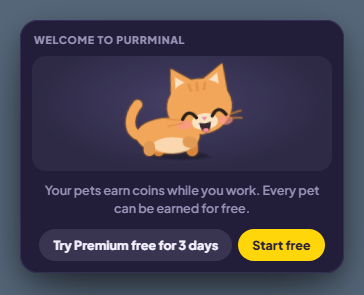
- It installs and opens by itself, in a few seconds. Choose Start free, or Try Premium free for 3 days (no card needed).
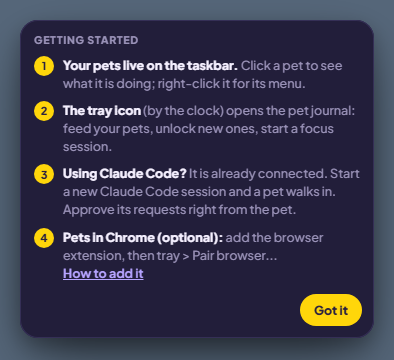
- A short Getting started panel explains the rest.
- Your pets appear on the taskbar, at the bottom right of the screen.
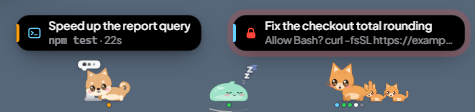
- Using Claude Code? The installer already added the hooks. Start a new Claude Code session and a pet walks in. Approve its requests right from the pet.
- Optional: pets in Chrome. Add the extension.
“Windows protected your PC”
Purrminal is new and not code-signed yet, so the first time you open it Windows shows this:
Windows protected your PC
Microsoft Defender SmartScreen prevented an unrecognized app from starting.
Click More info. A Run anyway button appears, with Publisher: Unknown publisher. Click Run anyway.
If Smart App Control blocks it outright, with no Run anyway button, use the portable version instead: download Purrminal-1.0.0-win-x64-portable.zip from the releases page, unzip it, and run Purrminal.exe.
Pets in Chrome (optional)
- Add the extension. Until it's in the Chrome Web Store, load it from your PC: open
chrome://extensions, turn on Developer mode, click Load unpacked and pick this folder:%LOCALAPPDATA%\Programs\Purrminal\resources\engine\extension - Click the Purrminal tray icon (by the clock) and choose Pair browser….
- Type the code it shows into the extension's popup.
Open it again
Open Purrminal from the Start menu, or click the tray icon by the clock for the pet journal, Premium… and Getting started….
It also opens by itself whenever a Claude Code session starts, and closes itself after 10 minutes with no sessions.
Uninstall
Open Windows Settings, Apps, find Purrminal and click Uninstall. This also removes the Claude Code hooks and the Start with Windows entry.
Your pets, coins and settings stay in %LOCALAPPDATA%\Purrminal, so a reinstall keeps them. Delete that folder to remove everything.
Where it installs
Just for you, in %LOCALAPPDATA%\Programs\Purrminal. Stuck? Email [email protected].